



Facebook has millions of users, and it is the most popular social networking site in the world. Facebook Video Advertising is one of the best approaches for Brands to market online quickly. Here are the tips for Facebook Video Ads 2025.
Facebook claims it is receiving more than four billion video views per day and it is becoming a close competitor to YouTube, the most extensive video sharing platform.
Facebook video is an excellent opportunity for marketers to promote their brand. Most of the advertisements on Facebook are video ads.
Videos proved to deliver the message more powerfully, and the influence of videos on purchasing decisions of consumers is more.
With the technology available today, not only the bands but anyone can create Facebook video ad campaigns.
There is no need to have excellent technical skills or prior video experience.
For a successful Facebook ad campaign high-quality video is required and even more critical is to have engaging content.
Even though the quality of the video is low, people will share and like the video that is natural and has some emotions.
First Few Seconds of Facebook Video Advertising
Facebook video ads play without any sound in the newsfeed. Thus a compelling thumbnail is required to make the viewer click and watch it with sound or to tell the story visually as appealing so that they understand the content even if they do not know to unmute the video.
Facebook ‘Ad Captions’ feature allows adding text overlay automatically. Text overlays are helpful to highlight the text in the video or divert the users to a call to action.
The call to action can be anything from visiting a website, becoming a subscriber, etc. Use great thumbnails to capture the attention of the audience while they are scrolling through the newsfeed.
Call to Action (CTA)
The CTA of the video can affect the success of it. Call to action should be natural and seamless. The audience must not get the feeling that they are being forced to take action. The request to take action should be a logical next step.
It should make them feel that the level they take will be of some value for them. The marketers can have a soft call to action at the beginning of the video and a strong one at the end of it.
High-quality Videos
Upload high-quality native videos to Facebook. Do not share the YouTube or other links. Native videos bring more views and get a lot of shares. Check the format of videos, aspect ratio, frame rate, size of the file that is allowed on Facebook. Also, check the length of the video that is allowed.
A successful Facebook video ad campaign should have created that helps in brand building, it should target strategically, and measurement is another critical area to focus.
The first few seconds of the video are crucial to getting the attention of the viewer. Since these video play without sound, make the audience want to click the video and turn the sound.
Even if the video is playing without sound, it should make sense and convey the story effectively to the viewer. Using captions is necessary for this. Be real when making ads for social sites. Use the language that people can easily understand.
Target Audience
Targeting different groups of audience on Facebook is easy. Create multiple videos with own ad set for a diverse targeted audience.
Native Videos
Facebook favors the native video uploads that are uploaded directly than those third-party video embeds. Native videos on Facebook reach more people and can get double the amount of likes, shares, and comments that the third party videos.
The interaction rate of Facebook native videos is higher than the embedded videos. As said above, the share rate is also higher compared to other videos. Add some emotional element to the Facebook video ad content. This aspect makes the people continue to watch the video till the end.
Focus on One Key Point
To get more shares for the video the video should focus on only one key point. The point should be easily understandable.
When the audience can summarize the video in one sentence, people will want to share it as they can explain what the video is about.
People share the videos to be social, to express feeling about a trending topic, to show that they are the first ones to find something and to impress friends and colleagues.
Be specific
Brands can have a presence on multiple social media platforms. They might want to post the same video on all these platforms. But what recommended is that create a copy that works better for Facebook.
Facebook gives high character limit. The brands can experiment with long and short prints. Short copies drive more clicks, and long texts generate engagement with the audience. To generate engaging Facebook Video Advertising, experiment with the length of the video.
Facebook Metrics
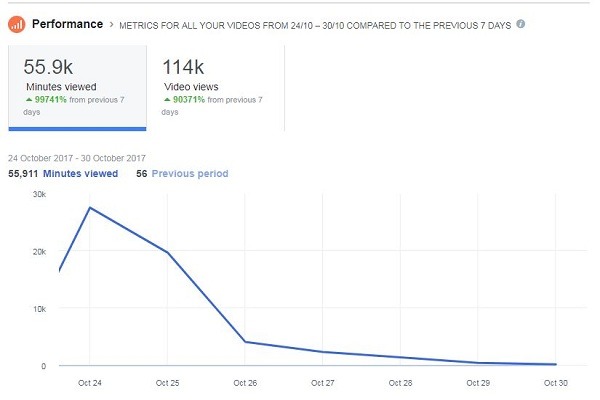
Facebook video performance can be analyzed with the metrics like minutes viewed, number of views, average watch time, etc. These insights also give the information about the reach of the video and the engagement.
Facebook ad campaigns should follow the best practices applicable including creating engaging content, adding the emotional element, taking care of the quality of the audio and video, etc.
So that the audience will stop and take notice. Marketers must create content that is most suitable for the platform. A successful video should make its impact in the first few seconds and even without sound.
In and Out of Facebook Video Ads
Facebook has been on the brink of a video revolution ever since it started harnessing the power of digital video. The number of times a video viewed on Facebook, the more Facebook has garnered attention regarding using video for marketing and advertising purposes. As digital video consumption continues to grow, brands are increasingly turning to online video ads. Past studies show that adding video ads to display campaigns improves performance, so now advertisers want to know how video delivers value on its own. Online channels like News Feed changed how people consume content, giving them the power to decide what content (including ads) warrants their attention. If they don’t like what they see, they scroll past it. And, even if they do stop long enough to see a video ad, people respond differently to videos. Some people see the video, but don’t stick around to watch it. Others watch part of the video and move on. So how do you quantify the total value of a video ad online, where reach and views are often different?
More and more, people are uploading, sharing, and discovering videos on Facebook. Video views grew more than 50% from May through July of this year, and since June, there has been an average of more than 1 billion video views on Facebook each day. For marketers, digital video, particularly on mobile, is becoming more important as well. Combining sight, sound, and motion, video creates experiences that are, at their best, memorable, moving, and inspiring the types of experiences that help brand marketers drive essential metrics, including awareness, consideration, and, ultimately, sales. People will also begin to see how many views a video on Facebook has received. Views will show on all public videos from people and Pages. We believe this will help people discover popular videos, and help businesses quickly gather information about how their videos are performing.
Facebook has become a severe platform for brand-building, and video is leading the way. When it comes to video ads for our clients, based on engagement rate, cost per view, view-to-completion, and reach, right now Facebook is winning by a landslide.
Facebook Video Ads Design Guidelines and Steps
The designing of the ad plays a vital role in the success of the advertisement, which can help the users to monetize the application with the Facebook platform. Facebook is the platform that allows best targeting and metrics with real-time optimization, which are very much required for the advertisers. The network on Facebook helps the advertisers to reach millions of audiences within a short period. So, in order to maximize your ad ability and outlook, the designing of the Ad on Facebook is essential to grab the attention of the audience. Here are some best ways to design Your Facebook ad.
Designing Guidelines
Know the formats
A specific format that is suggested by the Facebook platform can help you to reach the audience with good quality of content and easily accessible content. Always try to upload the video, which is below 1.75 GB in size. Also, keep your video frame to 30 at maximum. Be careful with aspect ratios and choose it wisely by following the suggestions given by the Facebook platform. Keep H.264 compression on video and scan it progressively and make it fixed frame rate. Go with MP4 format.
Thumbnails
Thumbnails are the first look to your video content. So, choose effective thumbnails which can attract the viewers at first sight on your video on Facebook platform. Don’t include more than 20 percent text in the thumbnails. Make it relevant, vibrant to the viewers. Choose 128Kbps and Stereo AAC video compression.
Designing of Slideshow
Design the slideshow in the news feed images with the 1280 into 720 pixels size format. The text must be within 90 characters and not more than that. The images with the same suggested size the aspect ratio is preferred to avoid the cropping of images.
Facebook Video Ads Design Guidelines and Steps
The designing of the ad plays a vital role in the success of the advertisement, which can help the users to monetize the application with the Facebook platform. Facebook is the platform that allows the best targeting and metrics with real-time optimization, which are very much required for advertisers. The network on Facebook helps the advertisers to reach millions of audiences within a short period. So, to maximize your ad ability and outlook, the designing of the Ad on Facebook is essential to grab the attention of the audience. Here are some best ways to design Your Facebook ad.
Designing Guidelines
Know the formats
A specific format that is suggested by the Facebook platform can help you to reach the audience with good quality of content and easily accessible content. Always try to upload the video, which is below 1.75 GB in size. Also, keep your video frame to 30 at maximum. Be careful with aspect ratios and choose it wisely by following the suggestions given by the Facebook platform. Keep H.264 compression on video and scan it progressively and make it fixed frame rate. Go with MP4 format.
Thumbnails
Thumbnails are the first look to your video content. So, choose effective thumbnails which can attract viewers at first sight on your video on the Facebook platform. Don’t include more than 20 percent text in the thumbnails. Make it relevant, vibrant to the viewers. Choose 128Kbps and Stereo AAC video compression.
Designing of Slideshow
Design the slideshow in the news feed images with the 1280 into 720 pixels size format. The text must be within 90 characters and not more than that. The images with the same suggested size the aspect ratio is preferred to avoid the cropping of images.
Guide To Generate Leads With Facebook Video Ads
Lead generation is one of the hot topics across the web in video advertising. Lead generation means the interest shown by the consumers towards a product or services of business online.
to generate interest in your consumers, you have to follow several steps to reach your targeted lead generation with Facebook video advertising.
Here is an ultimate guide for the generation of leads on the Facebook platform.
Facebook video ads
Facebook platform is offering different types of video ads and text ads on its platform for business to increase their sales leads. Each and every ad has its own importance.
The marketers have to choose the right ad type on the platform based on their targeting and other requirements.
The ads like a multi-product carousel ad that targets the newsfeed as well as the mobile devices.
The businesses can advertise multiple products featured in these carousel ads on Facebook. It supports up to five products in the Ads.
The Canvas ads are very interactive as it grabs the user’s attention and can target only mobile users. It loads faster in standard mobile web applications.
Page post video advertising ads on Facebook will get high engagement levels and also leads to a strong connection between the audience and your ads.
Video advertising always be at the top place as videos have greater engagement rates than any other media format in marketing and advertising.
The lead generation ads on Facebook are the most effective way to raise the interest in the audience as well as to convert the leads into customers.
The lead ads allow the users to sign up to receive the information about the businesses just by tapping on their Smartphone.
The lead ads work well than any other ads on the Facebook platform as it can deliver the direct leads report to your business where you convert the lead information and transform them into your customers to your business products.
Lead Generation Facebook Video Ad using Power Editor
The Facebook lead generation ads are delivering the native signup flow which allows the people to click on the ad and signup on the same page without deviating to another page form the Facebook platform.
Start your lead generation ads with Facebook power editor.
Download and click on to the Facebook power editor at the top corner of the page and select the ad account to download
Click on to the ‘create campaign’ and choose lead generation as your objective of your campaign.
The users can also reset the power editor feature by tapping on to the right corner at top of the page.
The next step is navigation to the ad set level and you can create new ad set and if you want to edit your ad you can click on to the edit button.
On the ad set level, you can choose your Facebook page and accept the terms and conditions for the lead generation ads on Facebook.
Don’t forget to specify the campaign settings which include your expected budget and schedules.
The new lead ads will also update time to time with new features on the Facebook platform.
The users can select the mobile platforms like android or iOS. You can also set for all mobile devices as your option.
The final thing is optimization and pricing follow with campaign settings and ends with uploading the changes.
Advantages of Facebook video ads
• It provides specific targeting options basing on demographics
• Facebook video advertising is cost effective and flexible.
• Increase your reach.
• Better engagement level.
Therefore, all these above steps and points can guide you to grab better leads on Facebook platform.
Guide to Automatically Add Captions to Facebook Video Ads
The popularity of video ads on Facebook is increasing. Based on internal and external studies that revealed how the social network consumed, Facebook announced suggestions on how to get maximum benefits for video campaigns and also some features for video ads to be more effective. Steps to add captions to Facebook Video Ads automatically have been explained here.
Facebook video ads appear as the user scrolls the feed, and this autoplay silently until the user decides to watch the ad and click on them. Though the autoplay feature is a great way to get the attention of the customers, these play only silently, and the marketers are missing a great opportunity.
Here comes the benefit of captions and subtitles for
FacebookVideos. The closed captions and subtitles proved to increase the engagement and also to get a better SEO ranking.
Automatic captions for Facebook videos
Adding captions for Facebook videos is not simple. For this, the advertisers needed to embed captions, upload caption files etc. But Facebook is now is adding automatic captions to the video ads and the marketers have the choice of editing the captions generated by Facebook.
A new tool introduced by Facebook creates captions and asks the advert risers to review them. After generating the captions within the ad creation tool, Facebook prompts the marketer to review and edit the captions.
To add automatic captions to the Facebook video ad. First, the video is to create in the power editor. Access the Manage Ads feature and then choose the Create Add option. Name the ad and then click on create.
Fill the details of the ad in Create Ad section. Choose Select a Video button from the ‘Video’ option. Here, choose the ‘Upload Video’ options. Go to the Video caption and choose ‘Generate Automatically.’
The creators now have two options which are ‘Review manually before they added’ and ‘Let Facebook review for accuracy and add automatically.’ When the user chooses the ‘Review manually’ option, Facebook sends you a notification after the captions generated.
The quality of auto-generated captions for Facebook need not always be great, and the marketers need to review and edit them to get the maximum benefit. Video captions help to make the users understand and access the videos better.
How important are captions for Facebook Video Ads?
Millions of hours of video are watched every day on Facebook. It also proved that when videos automatically play in the feeds, most people act negatively. These play without any sound, and when there is no sound, some videos may fail to get any benefits with the autoplay feature.
Most people use their mobile devices to access Facebook. The way video ads engage users on mobiles is different from the way they engage on the desktop. The video ads auto-play without any sound on mobiles.
There are only a few seconds for the videos to grab the attention of the user so that they click on the videos and watch them. Facebook revealed that adding captions to the video Ad helps engage the people longer.
Users keep scrolling through their feeds, and unless the videos capture the attention of the viewers, the campaign is not going to be successful. Facebook automatic captioning is expected to encourage people to check the videos that appear in feeds.
The video ads must be able to visually engage the users so that they are influenced to click them to play and there with the presence of the captions, and there would be no need to turn up the volume. On the part of the advertisers, they must make video ads to sit the environment which plays the videos silently.
20 Facts about Facebook Video Ads
Facebook started to show ads in the middle of the video and send money to the publisher. Facebook wants to show more video ads to the people and raise the revenue for publishers. There are some interesting facts we should know about Facebook Video Ads.
You can post your ads in Facebook support video, or else you can boost the video post to make it a video advertisement. We need to make sure that if you raise your ad, the Facebook advertising policies apply to those ads.
- Facebook had kept a three-month test on the group of users, before the launch of Facebook Video Ads
- Facebook had partnered with the Mindshare and Studio Summit media companies for the first set of video ads on its platform
- The Facebook Video Ads expenditure in the US had reached 36 billion
- More than two million advertisers actively going on the Facebook platform.
- More than 700 million users were visiting on Facebook through mobile
- More than 62 percent of revenue was made from mobile Facebook usage
- The CPM rates are lower if the ad was targeted on Facebook by the Customer audience
- More than 20 percent of Fans like the business page if they are researching on a particular product online
- Facebook provides an open communication facility between the consumers and marketers
- More than 70 percent engagement of the audience was noted on the Facebook platform in the first five hours itself.
- The posts which are included with the emoticons have greater engagement levels on the Facebook platform
- The posts with the emoticons have 34 percent high shares and 50 percent more likes
- The algorithm on the Facebook platform mainly targets the news feeds
- Facebook autoplay video ads are having great engagement with the audience
- More than 69 percent monthly users are noted in US and Canada regions having connectivity with local business
- The Facebook native videos are also having a better following just like autoplay video ads.
- It was revealed that more than 38 million active business pages are identified on the Facebook platforms which are also following the premium Facebook ads.
- The ad clicks on the Facebook platform have greatly increased over a year with more than 158 percent raise.
- The short posts on Facebook were receiving more than 60 percent of more engagement
- Friday is the most effective day for posting on Facebook, and it was revealed that the afternoon hour was the best time.
An Extensive Guide on Facebook Video Ads
Facebook had already tested the advertising feature with the Facebook platform challenging the Youtube platform in video advertising. The new video ad feature on the Facebook platform had made some simple changes for its audience. Now, the users can see the suggest videos option on their news feed. If the user likes to click on the suggested video button, then it will get the pop-up and produce a list of videos recommended to the user.
The list will be curated based on the type of videos you have watched previously. The videos will include autoplay while scrolling them. There will be ads in between the video ads which play automatically. The autoplay video ads had already attracted several marketers on the platform and gaining great results with them. Facebook video ads play a vital role in business brands.
Facebook ads can acquired on the basis of auction. The advertisers have to pay base on the clicks and impressions. Many ad formats offered by the Facebook platform. One can create their ads by themselves by using the interface provided for the self-services by using the certified ads API developers. Facebook ads are two different categories in which they have sponsored stories and the ads.
Business ads can be varied in different types of mobile app ads, event or domain or Pages like ads and page post ad video, offer ads and much more types of formats in the ads provided for the marketers by the Facebook platform. The Facebook premium video ads also having great results in marketing and very soon the platform was expected to announce few more developments on its ad features for the advertisers and marketers to succeed.
Best Practices for Creating Facebook Video Ads
Video became the essential element and turned into a buzzword in advertising. When it comes to video advertising, Youtube is the name that strikes in every mind, and now, the days changed, and its time for Facebook, which was trying to overcome Youtube in video advertising. For this competition, the platform had already got ready to knock its competitors with its brand new features in ads for publishers and advertisers on its platform. So, Facebook video ads become more powerful today, with creativity and quality in one place. But, it relies on the advertiser’s thoughts in reaching their audience and here are some ways to create best Facebook ads for your advertising.
Best practices
Get Matched your content with the audience interests.
Audiences are the main target in every campaign and business advertisements. So, create content which can attract the audience and which can make them completely involved with the content. So, your video can give better results.
Invest on what you highly required for your ad.
Attract and grab the people attention in few seconds after the video begin to play. So, focus on it carefully and succeed.
Storytelling
Storytelling is very important and plays a vital role. It must not be boring, but it must be entertaining and innovative to watch then only it went through the minds of the audience to know more about your brand.
So, create accordingly. When it comes to the premium Facebook video ads, it requires great attention while advertising as your video must raise curiosity to watch as they play without sound at first. So, after the interest of the audience, only it can be get clicked and play with sound. So, be careful while creating autoplay video ads on the Facebook platform.
How to Create Auto-Play Facebook Video App Ads
Facebook was in its race along with the other social media platforms in video advertising. At one point, many tech savvy’s thought, it may overcome the Video giant Youtube platform in a few years in video advertising. Facebook video quality and the consumption of the data are the very best compared to the Youtube channel. Facebook has introduced autoplay video ads for the advertisers on the Facebook platform.
The autoplay video ads play automatically on the user’s news feed without any sound or music. Whenever the users click on to the ad, then only the window pops up and play in full screen with good sound. It makes a sensational way of marketing and advertising on the Facebook platform as these type of ads will not disturb the privacy of the consumers or users on Facebook platform.
Creation of mobile app video autoplay ads – the dynamic ads
Facebook had also targeted the mobile app video creation in autoplay video play format for mobile devices. These ads can efficiently target the users with dynamic product ads, which can retarget the audience too. The platform was also going to open the network for the ads for all types of applications.
The personalised ads can be sold by the Facebook. The dynamic product ads can run by showcasing products, and the users can now purchase directly by viewing the ads which can optimize the sales for the business. So, the updated feature was included with the autoplay and clicked to play ads along with the carousel ads on Facebook. It is also revealed that the apps on Audience network have eight times greater engagement comparing to the general banner ads on Facebook.
Facebook Premium Video Ads
Facebook revenue had grown towards the 50 percent raise comparing to the previous two years revenue. It was listed under the top fastest-growing companies in the world and acquired rank tenth in the world.
The main thing behind its growth is its latest improvements and the continuity of the development at various verticals in video advertising. It grasped the trending element and developed accordingly basing on the present markets. It developed with various types of video ads, and it is the reason why the advertisers choose Facebook for their growth of sales.
Have a deep view towards the Facebook premium video ads and its impact.
Premium video ads on Facebook has paved a new way to the advertisers in order make their branding special with good objectives. At first, the platform had tested the ads with the selected advertisers by forming them in groups. The Premium video ads are designed especially for the advertisers who had an objective to reach a large audience with good quality content.
The premium video ads allows the advertisers to upload a 15 seconds length video ad that will play without any sound and can also be called it as an autoplay video ad on the Facebook platform. The autoplay premium Facebook video ads can appear on the screen and plays automatically. But, it doesn’t disturb the social environment of the audience. If the people are interested and tapped on to the video, then it will pop-up to play full screen with sound. These type of ads helps to gain gross rating points within a short span.
Guide to Facebook Canvas Ads
What are Facebook Canvas Ads?
Mobile advertising till now was limited to banner ads and pop-ups but Facebook introduced canvas ads which as instant ads that appear in the news feed. Facebook canvas ads are only available on mobile but not on the desktop. It is straightforward to create Canvas Ads as tools are provided by Facebook to create them. While scrolling down, the user can see the canvas in the newsfeed, and if they click them, the mobile screen will be completely taken over by the brand content. If the user wants to click out of the advertisement, he can do so at any moment.
Specs and requirements
Facebook provides tools for the user to create Canvas ads. For this, you need to access the publishing tools. Choose the canvas option, Select the create option, and a screen will appear where you have to enter the title of the canvas add Enter the theme, photo, and button. You can add a video, text, photo, or product set. Click on ok and add them to the canvas.
You can choose the color, Images that added to the Canvas ads must be full width, and full height images and the sizing options available are fit to width and fit to height. Supported image file types of .png and .jpg. Users can enter text up to 500 words in the canvas ad. Font size can choose between 6-72 pt. The letters can align with left, center, or right. Bold, italic, and underline font styles are available. You can preview the ad you created on Canvas on mobile or tablet and make necessary changes if needed.
Video Facebook Canvas Ads
Facebook video ads run automatically when scrolling down. Facebook allows you to add a video to Canvas ads. The minimum resolution of the video should be 720 p. Let your video length be two minutes and not more than that. The formats that are allowed are MP4 and MOV. More than one video can include in the ad format, but the total length of the video must not be more than 2 minutes.
Facebook has many active users who access the platform on mobile, and bringing your product or service to these sections of Facebook users is easier with video canvas ads. This new platform can be accessed on tablets and mobile also. Let your video ads be novel and interesting to help engage the audience. You can add a button to the ads to direct the users to your product page or webpage or blog. Fully utilize the storytelling opportunities and make your mobile marketing a great success as these are highly visual and engaging.
Facebook Canvas Ads Tips
• Create Facebook ads with interesting videos and this is sure to increase conversion. Facebook ads are very slow to load but the canvas ads load within seconds on mobile. This helps to connect with audience within no time.
• This visual feature will keep the consumers engaged.
• Add product catalogs to your ads in the form of images or videos. This helps for the brand promotion and increases leads.
• Use video canvas ads for website conversion campaigns.
These are like any other mobile ads, but when the users tap the video, they can experience the full-screen ads, the users can tilt, zoom the images. This feature is a fast loading ad feature which can be used effectively for marketing purpose. Overall canvas ads allow you to present the mobile viewers with the miniature version of your website. This feature of Facebook will help a lot in boosting brand awareness and generating leads.
Facebook Video Advertising: The Ultimate Guide For Brands
We all are much familiar with the most commonly used word Facebook which is using for the purpose of communication. It is the only brand ambassador for the whole social media community as it is the trending platform since it started. Now it has a huge demand in the global market as it is the major stream to elaborate the business brand using video to advertise on it. What are the actions going to take place in Facebook video advertising? Everything is here
Facebook Video Advertising Examples
Facebook has offered an exclusive system of advertising on it by using video and the video ad on Facebook will directly catch the audience who are relevant to our designed ad.
Facebook has made an advancement of allowing all the advertisers to participate in an auction which leads them to put some bid on the video ads that they are going to launch in the Facebook of required users based on the location and the audience preferences.
There are different examples of Facebook video which proved their caliber to generate optimized Facebook video ads by considering the Facebook designed specifications like the use of related ads, effective video ads, and insertion of call-to-action.
Daily mail (The cutest Christmas ad of all):
There are no words to explain this ad. In this, the ultimate creation of the advertiser had emotionally touched the audience by placing two Bears representing old people of the missing family. This has been given happy ending by Heathrow to connect with their family. Here it is completely related to the people who want to get airlines of Heathrow.

Sean Hayes:
In this ad, we can find the ultimate visual effects of that Doritos are coming from the fast spinning washing machine and catching immediately. This is the ad where the visualization works.

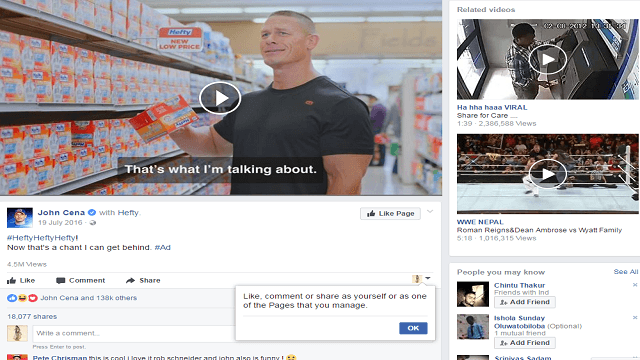
John Cena (with Hefty):
Here the legend of wrestling has revealed the secret of being strong by the comparison of weak one. At the end, we can find the Hefty which is blinking to visit. Moreover, they had added some fun which is more interesting for the audience.
Facebook Video Advertising Cost
Facebook usually gives the competition between the video advertisers through a bid. But how much the Facebook cost to make video ads.
The actual cost of ads per day is $1 and the cost of the ad changes depending on the location, days and ad types you choose.
How to find better ways that reduce the ad cost?
There are different types of ads like cost per action, cost per impressions and cost per action.
Cost-per-action:
This is the only thing which helps to find the result of the Facebook video ad either positively or negatively going on Facebook.
This can be obtained through the activity of the audience by downloading, like or getting a response from the targeted audience.
For this, you need to spend more than $20 per action on an average. $1 or more is enough if your target is to make the audience to download.
Cost per impressions:
Here you need to pay for the 1000 impressions which have been made after the 1000 people visit of your ad. The price may vary depending on your target.
Cost per click:
This is also hanging on the area you choose, company and audience target.
If you choose the people of 45 to 54 old people then the cost per click is $0.29 on an average.
In the UK the cost per like is about $0.55 on an average will be obtained.
When you utilize $100 for each day and if you have CPC like $0.30 then you will get clicks like $100/$0.28=357 on one day and may vary on the second day.
Facebook Video Advertising Best Practices
Generate highly qualified ‘video content’ that should be in the unique format.
Insert the option of ‘call-to-action’ after the completion of playing a video which in return will clutch the more audience.
When you fixed to gain the concentration of audience then you should not forget to make the extraordinary ‘thumbnails’. This will automatically lead huge traffic for your ad.
Assign astounding ‘titles’ by adding a little bit of enthusiasm for your video ad that no one predicts.
Try to immerse ‘celebrities’ related to films, sports or political who are being sensations for the current trend.
Make ‘short and simple’ video ads at which the audience should not be bored.
Select the ‘content’ that either emotionally or humorously touches the audience.
Push the ‘multiple video ads’ at a time with different ad formats that really works.
Facebook Mid-roll Video Ads
The concept of Mid-roll video ads sounds somewhat different. It can elaborate on the stunning activity of Facebook in a commercial way.
Mid-roll ads are nothing but the ads played in the middle of the playing video that is a 15 seconds ad will be playing within the video of about 5 minutes.
When the audiences are completely in the world of watching that Facebook video then they will not bend their heads to stop watching that video then it could be more beneficial for the advertisers to explore their brands by displaying mid-roll ads.
These mid-roll ads are placed in all types of Facebook videos of a news feed and making a strategy to run in the live videos. These ads help get more conversion rate.
Best Facebook Video Ads
Always prefer the Newsfeed video ads of mobile as it is the audience needed a device which can provide the call-to-action option along with a full screen to watch the video.
Maintain the list of users who visited your blog or landing page to generate the multiple related ads.
Use the best of the best device to record the moments of the video with amazing backgrounds which can attain the attention of the audience with excitement to watch full ad.
The main things to be on the list of Facebook best video ad upload that ad only on the Facebook that appears nowhere.
Use the trending concept of Facebook 360 degree video as in your Facebook video ad. It could be more interesting to watch than regular video ads.
Circulate something strange about the video ad that you created, and this makes to get more shares or whatever you mention below the ad will be obtained.
All these strategies can make an ad to be the best fit Facebook video ad by reaching more than the targeted audience.
Facebook Video Ad Viewability Rates and Best Practices
Viewability is tracking the ad impressions. These can be seen by humans and are also called viewed impressions. One of the most popular social media site Facebook allows advertisers to check the viewability of the ads independently. It can also be checked whether the ads reached the right people or not.
Increasing the Facebook video ad viewability rates improves the performance of the ads, which proves to be beneficial for the advertiser. Many factors improve the viewability of Facebook ads. The important ones are placement, quality, etc. A video ad must be seen for at least two seconds to consider it is a view. Here are the best practices for improving the viewability of Facebook video ads.
• The video content that you create should be engaging and relevant.
• Increasing rate of mobile viewing is decreasing the ad viewability rate, and so it is essential to optimize the videos for mobile.
• There are many placement options for video ads on Facebook.
• A/B test with different placements at different audiences etc
There are two components for Facebook video ad viewability, and these are whether the audience sees the ad or it can be seen. According to market resources, two-thirds of the marketers in America run their ads on Facebook. This raises questions about whether advertising is allocating the right amount for advertising their brand on social media sites such as Facebook.
Viewability tracking is more important for advertisers as this allows measuring the performance of the ads. To ensure that the Facebook ad passes the viewability score, publishers should adjust the position of the ad, increase the video player size, install a floating video player, etc. More than this, the video content should be engaging and relevant.
A Beginner’s Guide to Create a Facebook Video Ad with Power Editor
Power Editor is a program module made by Facebook as an approach to oversee and mass alter advertisements. If you need to make a progression of ads with various pictures, diverse content, and distinctive focusing on, then utilizing Power Editor ought to be a piece of your Facebook methodology. It takes a shot at a download and transfer framework, so every time you need to work in Power Editor you download the more significant part of your information from the Ads Manager and after that make your crusades, promotions and advertisement sets inside Power Editor.
At that point, you click Upload Changes to begin running your promotions. Your promotions will then be accessible to see from the Ads Manager. On the off chance that you have to roll out any improvements to elements that are just accessible in Power Editor, you will need to re-download your advertisements, roll out your improvements and transfer them once more.
Facebook video advertisements with Facebook power editor
Power Editor is an inherent element for making Facebook video advertisements. You can, without much of a stretch, see how the system functions if you take these rules given by Facebook. You will discover the Power Editor in your Facebook promotion supervisor. Before you begin with the formation of the battle, you’ ll has to download your promoting account from Power Editor. At that point, you’ ll confirm the information and you’ all make another campaign. Set Video Views as the target of your campaign; switch to the advertisement set view and make another set of your Facebook video promotions. This is the minute when you focus on your gathering of people.

Image Source: www.AndreaVahl.com
Presently, it’s an ideal opportunity to go from crusade perspective to promotion set perspective. Pick the advertisement set you made and tap on the Ads tab. At long last, you can make, name and redo another advertisement. This is the point at which you transfer your video and supplement the content of the ad.
The strides may sound befuddling when you read about them along these lines. However, Power Editor is entirely natural; you’ll promptly see how its capacities when you have a go at posting a video advertisement through it.
Facebook’s Live Interface likewise permits you to distribute Facebook Video Advertising. You begin by signing into your promoting administrator and tapping the Create Ad catch. Pick Get Video Views as the target of your crusade, and after that, pick the page you need to advance the video through. At that point, you’ll modify the settings for your intended interest group, spending plan, and offering the procedure. Right now is an ideal opportunity to transfer the video and set up the suggestion to take action.
Conclusion:
The Facebook ads are viewed by a person only if that person watched at least first 20 sec video after that they will get ads. The above article is guide for Facebook Video Ads.
Facebook Video ads are the best way to ensure people to remember your brands. Facebook video strategies Leads to rise in Website traffic, easy promotion through different social media platform.
Facebook Video Advertising: Tips for Facebook Video Ads 2025 – FAQs
What Are The Key Goals Of Facebook Video Advertising?
Increase brand awareness, drive website traffic, generate leads, or boost sales through engaging video content.
How Early Should I Capture Attention In My Video Ad?
The first 3‑5 seconds are critical to hook viewers and prevent them from scrolling past.
What Is The Optimal Length For Facebook Video Ads?
Aim for 15‑30 seconds, short enough to maintain interest, yet long enough to convey your message.
Which Aspect Ratio Works Best On Facebook?
Vertical (9:16) or square (1:1) formats, especially for mobile viewers, outperform landscape.
Should I Design For Sound‑Off Viewing?
Yes. About 85% of users watch without sound. Include captions and strong visual storytelling.
When Should I Include A Call‑To‑Action (CTA)?
Place your CTA early—around the middle of the video—to ensure viewers see it before skipping.
How Important Is Storytelling And Emotion?
Very narrative-driven ads that evoke emotion are more memorable and impactful.
Should I Feature Social Proof Or Influencers?
Yes. Use testimonials, user-generated content, or influencer appearances to build trust and credibility.
How Should I Test And Optimize My Video Ads?
Run A/B tests on hooks, length, CTAs, visuals, and audience segments; use performance data to refine.
Can I Tailor Videos To Different Audiences?
Yes, customize creative and messaging for segments like new customers, repeat purchasers, or niche demos.
What Are Best Practices For Retargeting Video Viewers?
Use Custom Audiences to retarget viewers who watched 10–75% of a video with follow-up ads.
What Video Resolution And Frame Rate Should I Use?
Upload at 1080p resolution with 24–60 FPS for clear, high-quality visuals.
Do Thumbnails Impact Engagement?
Absolutely, eye-catching thumbnails can significantly improve click-through rates.
Is Music Or Sound Design Important?
Yes, complement visuals and emotion with well-chosen music, but ensure videos work without sound too.
How Often Should I Post Video Ads?
Maintain consistency, regular uploads (e.g., weekly) help retain viewer interest and stay relevant.
What Metrics Should I Track For Facebook Video Ads?
Monitor views, watch time, engagement rates, click-through rates, and conversions for insights.
Should I Use Facebook Reels For Video Ads?
Yes, Reels (short vertical videos) are high-engagement, mobile-first formats supported by powerful ad placements.
Can I Repurpose Video Content Across Placements?
Yes, adapt core content into feed videos, Reels, Stories, and in-stream placements for maximum reach.
What Editing Techniques Enhance Video Ads?
Use quick cuts, graphic overlays, pacing matched to music, and mobile-first optimization.
How Should I Choose Music For Ads?
Select trending or licensed tracks from Facebook’s library to avoid copyright issues and boost mood.
